Free · runs in your browser
Free online guitar tab editor
Write riffs and whole songs as guitar tab, then hear them played back. Open your Guitar Pro files, slow tricky parts down, and export to Guitar Pro, MIDI, audio, text or PDF.
Everything you need to write tab
Built for guitarists: quick to type, easy to hear, and it reads and writes the file types you already have.
Fast to type
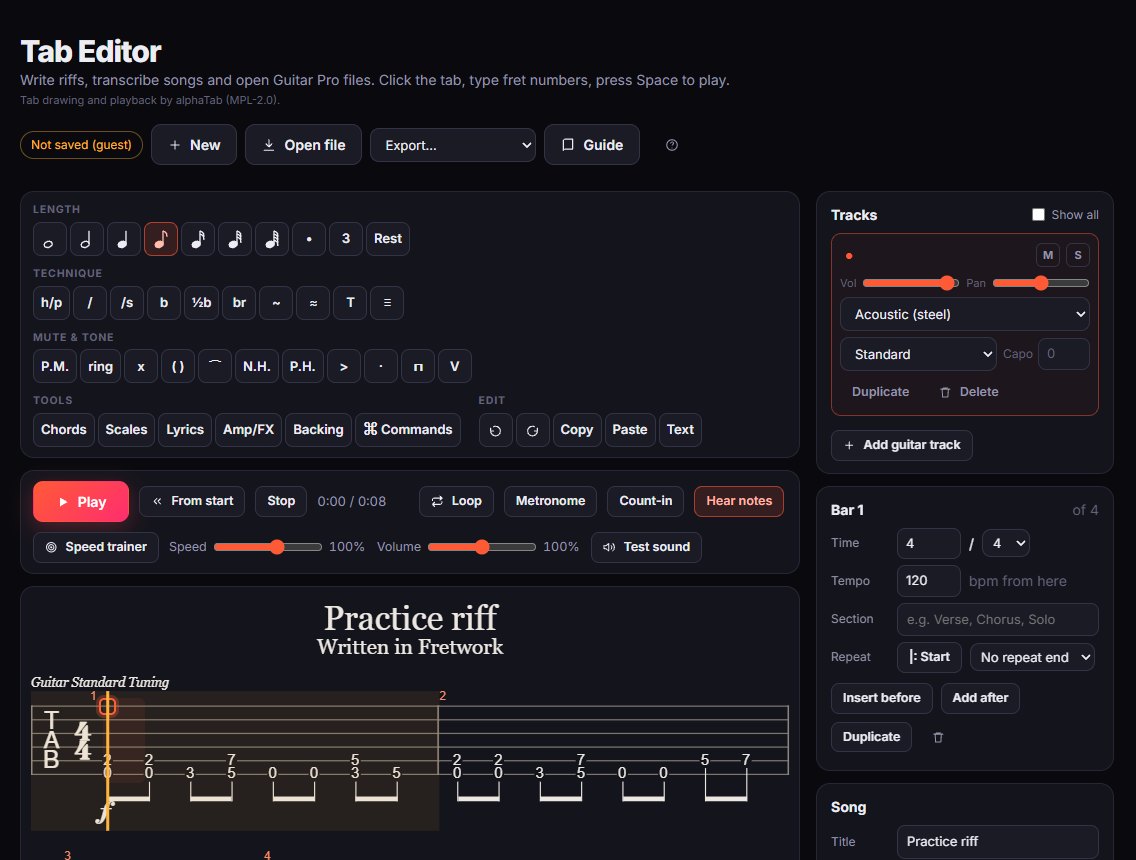
Click a string, type the fret number, move on with the arrow keys. Change note lengths, add rests and copy whole bars from the keyboard.
Guitar techniques
Hammer-ons and pull-offs, slides, bends, vibrato, palm mutes, dead notes, harmonics, let ring, accents and tapping.
Hear it play
Playback with a metronome, count-in, loop and a speed trainer that slows a part down and speeds it back up as you get it.
Open Guitar Pro files
Open .gp (Guitar Pro 7 and 8), .gpx, .gp5, .gp4 and .gp3 files, plus MusicXML and alphaTex text. All the tracks come with them.
Export anywhere
Save as Guitar Pro (.gp), MIDI, WAV audio, text tab, PNG or SVG pictures, or print it and save as PDF.
Amp, effects and backing tracks
Put the playback through an amp and pedalboard, or play along with an audio file or a YouTube video synced to the tab.
More than a tab notepad
Fretwork’s tab editor shows guitar tab only, so it stays clear and quick to edit. Underneath it’s a full score: you can have several tracks (rhythm, lead, bass, even drums from a Guitar Pro file), each with its own tuning, capo and sound, and a mixer to balance them.
- Chord dictionary and scale finder to drop chords in and check which notes fit.
- Bars, sections and repeats, time signatures and tempo changes.
- Lyrics and text above any beat.
- Command palette (Ctrl+K) to find any action by name, and full undo and redo.
- A searchable built-in guide that explains every button and shortcut.
Files you export as Guitar Pro open in Guitar Pro 7 and 8, TuxGuitar, Songsterr and other tab software. Tab drawing and playback are powered by the open-source alphaTab library.
How to get started
It takes about a minute, and you can try everything before deciding whether you want an account.
- Open the editorA new tab is ready to go. Or press Open file to bring in a Guitar Pro or MusicXML file.
- Type your riffClick a string, type fret numbers, pick a note length. Press Space to hear what you wrote.
- Keep or export itExport to Guitar Pro, MIDI, audio, text or PDF. Create a free account to keep your tabs in My tabs.
Questions
The things people ask before trying it.
Is the tab editor free?
Yes, completely free, with no adverts and nothing to install. It runs in your web browser.
Can it open Guitar Pro files?
Yes: .gp (Guitar Pro 7 and 8), .gpx (Guitar Pro 6), .gp5, .gp4 and .gp3. It also opens MusicXML (.xml, .musicxml, .mxl) and alphaTex text files. Your original file isn’t changed.
Is it a free alternative to Guitar Pro or Songsterr?
For writing, editing and playing back tab, yes. It reads and writes Guitar Pro files, so you can move between them. It doesn’t include a library of songs to download.
Can I export my tab as text or PDF?
Yes. Export classic text tab (the e|---0---| kind) to paste anywhere, or print to PDF. You can also export MIDI, WAV audio and PNG or SVG images.
Do I need an account?
No. You can write and play tab as a guest. To keep tabs saved in Fretwork between visits, create a free account.
Does it work on a phone?
It opens on phones and tablets, but writing tab is much quicker on a computer with a keyboard.
More free guitar tools
Everything in Fretwork is free and works in the same place, so your practice adds up.
Write your next riff
Open the editor, type a few fret numbers and press Space. That’s all there is to it.
Open the tab editor